Voicemail Number: How to Check Your Voicemail on Every UK Network

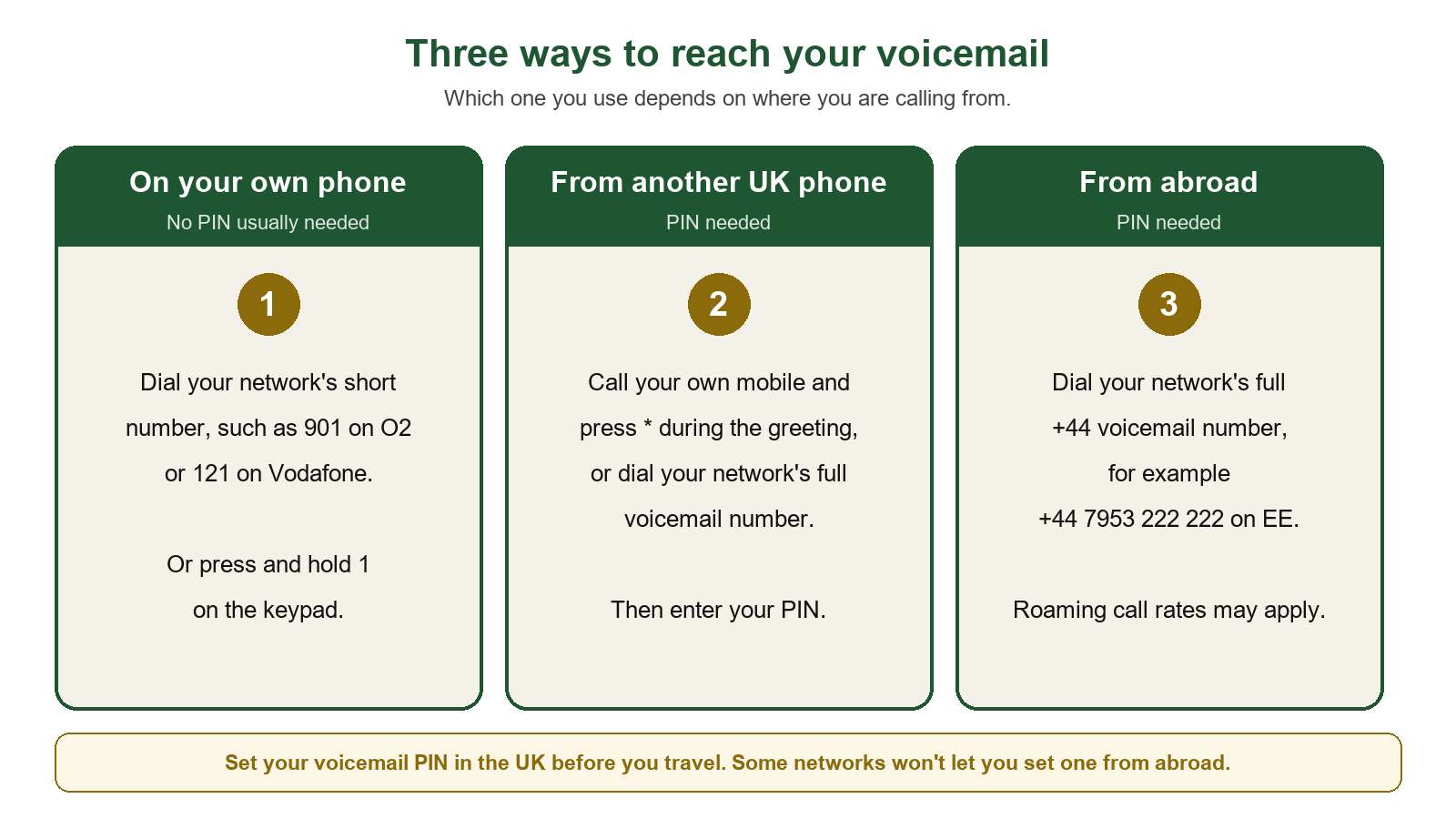
Your voicemail number depends on your network: 901 on O2, 121 on Vodafone and VOXI, 123 on Three, SMARTY and iD Mobile, 443 on giffgaff, 905 on Tesco Mobile, 759 on Sky Mobile and 222 on Utility Warehouse and 1pMobile. On EE, and on almost any phone, you can also press and hold 1 on the keypad. Calling from your own phone usually needs no PIN. From another phone or abroad you need a longer number and a voicemail PIN you have already set up.
Third-party lists often disagree: we found three different numbers given for Three alone. Every number below was checked against the network’s own help pages in November 2026. You will also find how to check your voicemail from another phone, what it costs, how to switch it off, and what to do when it stops working.
In short: dial your network’s short number or hold 1. Set a voicemail PIN now, from your own phone, while you are in the UK. Without it you cannot listen to messages away from your own handset.
Voicemail number for every UK network
| Network | From your own phone | From another phone or abroad | Switch off / on |
|---|---|---|---|
| EE | Press and hold 1 | 07953 222 222 (+44 7953 222 222 overseas) | Text VM OFF or VM ON to 150 |
| O2 | 901 | Overseas, 901 works in most countries; if not, +44 7860 980980, then your number and PIN | 1760 off, 1750 on |
| Vodafone | 121 | +44 7836 121121 | 1210 off, 1211 on |
| Three | 123 | 07782 333 123 (+44 7782 333 123 overseas) | Contact Three on 333 |
| giffgaff | 443 | Call your own number, press * during the greeting | 1626 off, 1616 on |
| Tesco Mobile | 905 | Call your own number, press *, enter PIN then # | 2915 off, 2905 on |
| Sky Mobile | 759 or hold 1 | Call your own number and press *; overseas +44 7488 222 000 | Cannot be switched off (see below) |
| VOXI | 121 | +44 7836 121 121 | 1210 off, 1211 on |
| SMARTY | 123 | +44 7782 333 123 | Through SMARTY web chat |
| iD Mobile | 123 | +44 7782 333 123 | Ask iD Mobile |
| Utility Warehouse | 222 or hold 1 | +44 7953 222222 | Ask UW |
| 1pMobile | 222 or hold 1 | Call your own number and press *, or 07953 222222 | ##002# off |
| Talkmobile | Press and hold 1 | Not published by Talkmobile | ##002#, or call 5888 |
You may notice the same long numbers repeating. That is because smaller brands use their host network’s voicemail system: SMARTY and iD Mobile share Three’s, VOXI shares Vodafone’s, and Utility Warehouse and 1pMobile share EE’s. Our guide to which network each provider uses explains those links. Talkmobile is the odd one out: there is no published Talkmobile voicemail number, so you press and hold 1.
Lycamobile, Lebara, BT Mobile, Asda Mobile and Superdrug Mobile are missing because we could not confirm their numbers from their own help pages. Pressing and holding 1 works on most of them. If it does not, the provider’s app or help page has the current number.
How to check your voicemail from another phone or abroad
Away from your own handset, the network cannot tell it is you, so it asks for a PIN. There are two ways in, depending on the network:
- Call your own mobile number. When the greeting starts, press * and enter your PIN. This works on giffgaff, Tesco Mobile, Sky Mobile and 1pMobile.
- Dial the network’s long access number. Use the one in the table, then your PIN. EE, Three, Vodafone and the brands that share their systems work this way. O2 is simpler overseas: 901 still works in most countries.
Abroad, use the +44 version of the number, because short codes such as 121 or 123 usually only work on your home network. Sky and VOXI both say you must set your PIN in the UK before you travel, or you will not get in.
Setting or resetting your voicemail PIN
Most networks ask you to choose a PIN the first time you call voicemail. If you skipped it or forgot it, here is how each network handles it:
- EE: call voicemail, press *, then 3, then 3. Use 4 to 10 digits, and EE asks you to avoid 2580 and 1210.
- O2: you set it on your first call. To reset it, text RESET to 802901.
- Three, SMARTY and iD Mobile: dial 123 and follow the settings menu. On Three, the PIN is skipped from your own phone by a feature called Fast Login. Turn it off if you want the PIN asked every time.
- giffgaff: text RESET to 802443.
- Tesco Mobile: the starting PIN is 8705, and because it is published, change it straight away to your own 4 to 10 digits.
- Sky Mobile: there is no default PIN. If you forget yours, dial 759 and enter a wrong PIN three times. Sky texts you a temporary one, then you press 3 and 1 to set a new PIN.
- VOXI: dial 121, press 4, then 2, and choose 4 digits. Three wrong attempts in a row lock the mailbox.
Pick something that is not your birthday, 1234 or the last four digits of your number. Your voicemail holds messages from your bank, your GP and your family, and a guessable PIN puts all of them one phone call away from a stranger.
Does it cost anything to call voicemail?
On most monthly plans with unlimited minutes, checking voicemail is included. On pay as you go, or once an allowance runs out, it is charged like a call:
- O2 and Vodafone: comes out of your minutes, then standard UK call rates.
- Tesco Mobile: included on pay monthly, then 15p a minute. Pay as you go pays 15p a minute.
- giffgaff: included in plans, or 8p a call on credit.
- Sky Mobile: included on Unlimited Calls and Texts. Pay As You Use pays standard rates.
- 1pMobile: 1p a minute.
Abroad, a call to voicemail is usually charged as a roaming call back to the UK. EE says it is free within the EU but may cost more elsewhere, and VOXI applies standard charges outside its Europe Zone. O2 adds that there is no charge when someone leaves you a message that you never play.
How to turn off voicemail
Use your network’s own code from the table first, because it also tells you how to turn voicemail back on. Two networks work differently:
- Sky Mobile says voicemail cannot be switched off completely. To stop people leaving messages, dial 759, then press 3, 5 and 1 to turn message recording off.
- Three has no self-service code. You contact Three on 333 from your Three phone to switch it off, and again to switch it back on.
There is also a general code, ##002#, which cancels every call divert on your line. Calls reach voicemail through a divert, which is why 1pMobile and Talkmobile list it for switching voicemail off. It does not work on every network, and it also clears any other divert you set up, so check your settings afterwards.
Visual voicemail
It lists your messages on screen, like emails, so you can play or delete them in any order without calling in. It uses mobile data rather than minutes.
- EE: iPhone and Samsung. Text Visual Voicemail to 150 to turn it on.
- Vodafone: iPhone, free in the UK and when roaming, apart from the data it uses.
- VOXI: iPhone only.
- Sky Mobile: compatible phones, no extra charge in the UK or when roaming.
- 1pMobile: iPhone, free, switched on in your online account.
- Talkmobile: not offered.
Voicemail not working? What to check
- Your phone has the wrong number saved. Holding 1 dials whatever voicemail number is stored in the phone’s call settings. After a SIM swap it can still hold your old network’s number. Replace it with the one in the table.
- You have just switched network. Expect a fresh, empty mailbox on your new network. Call voicemail once to set it up and record a greeting.
- You are locked out. Too many wrong PINs locks the mailbox on several networks. Use the reset route above, or contact your provider.
- The mailbox is full. Space is limited. Tesco Mobile keeps up to 40 messages for up to 30 days, and Sky Mobile up to 20 messages for up to 30 days. Delete old messages and new callers can leave one again.
Do voicemails move with your number when you switch?
No. A PAC code moves your number, not the messages stored on your old network’s system. VOXI states it plainly: your Vodafone voicemail is deleted when you move, including your greeting and saved messages, even though both brands belong to the same company. Before you switch, listen to anything you need and write down the details, or save the audio if your phone shows messages on screen.
Frequently asked questions
What is my voicemail box number?
It is the long number in the table for your network, such as 07953 222 222 on EE or 07782 333 123 on Three. You only need it when calling from another phone or from abroad. From your own phone, the short code or holding 1 does the same job.
Is 1571 a mobile voicemail number?
No, 1571 is the voicemail service for BT and EE home phone lines. On an EE mobile you press and hold 1, or call 07953 222 222 from another phone.
Why does voicemail answer before my phone rings properly?
Your ring time is too short. Some networks let you lengthen it. On giffgaff, for example, you dial **61*443*10*30# to ring for 30 seconds before voicemail picks up. Ask your provider for its version.
The short version
Hold 1 or dial your network’s short code from your own phone. Set a PIN today so you can reach messages from anywhere, and save anything important before you switch networks, because your messages do not come with you.
Sources
- EE — Use voicemail
- O2 — Voicemail
- Vodafone — Set up and manage your voicemail
- Three — Using voicemail
- giffgaff — Everything you need to know about voicemail
- Tesco Mobile — Using voicemail
- Sky — Sky Mobile voicemail
- VOXI — How to set up your voicemail and Bring Vodafone voicemail to VOXI
- SMARTY — Setting up voicemail
- Utility Warehouse — Setting up and accessing mobile voicemail
- 1pMobile — Voicemail FAQs
- Talkmobile — How to activate or turn off voicemail
- iD Mobile numbers are from staff answers on the iD Mobile Community, May 2026.
Last reviewed 10 November 2026. Networks change their codes from time to time; this table is re-checked when they do.