How to Change Your Phone Number in the UK (and What to Do First)

To change your phone number in the UK, ask your current network for a new number. You usually keep the same SIM, plan and contract; only the number changes, and it is normally chosen at random. Some networks charge a small fee, and on giffgaff you can do it yourself in your account. The other route is a new pay as you go SIM, which comes with a different number straight away.
The change takes minutes. The work is in what comes before and after it: security codes, banks and messaging apps all need updating, and the old one cannot usually be got back.
In short: move your security codes off the old number first → ask your network for a new number → update your apps, your bank and anyone who texts you. Changing because of nuisance calls? Try blocking and reporting first.
How to get a new number on your network
| Network | How to ask | What to expect |
|---|---|---|
| giffgaff | My Profile and Settings → Get a new giffgaff number | Free, done yourself up to twice. Up to 4 hours without service. Cannot be reversed. |
| Vodafone | Online chat with Vodafone | You may pay a £25 admin fee |
| EE | Call 150 or use EE’s online chat | Ask about any fee before you agree |
| O2 | Call 202 (pay monthly) or 4445 (prepaid) | Ask about any fee before you agree |
| Three | Call 333 or use live chat | Ask about any fee before you agree |
On other networks, contact customer services and ask for a number change. Call from a different phone if you can: the line may drop the moment the old number stops working. And make sure you ask for a new number, not a PAC code. A PAC code does the opposite job: it lets you keep your number when you switch network.
The other route: a new SIM
A pay as you go SIM from any network gives you a fresh number as soon as it is activated, and SIMs are often free. This suits you if you want a second number, or a fresh start on a cheaper network. If your current line is on a contract, cancelling it early can mean an early termination charge, so check before you stop paying.
Before you change: protect your accounts
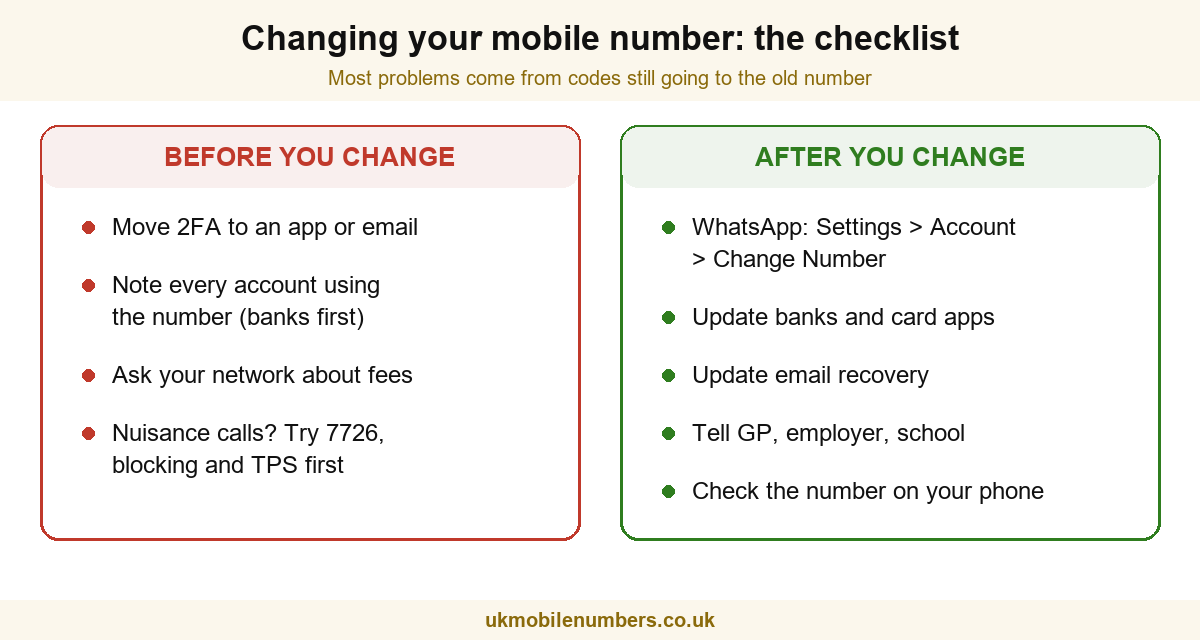
Once the number changes, texts to the old one stop reaching you, including the security codes your bank and email send. giffgaff warns that you will no longer receive two-factor codes after the switch. Do this first:
- Switch two-factor login to an app or email where you can, or add the replacement as soon as you have it.
- List every account that uses your number: banks and card apps first, then email, government accounts, delivery and shopping apps.
- Back up anything tied to the number, such as your chat history.
Changing because of nuisance calls?
A new number is the last resort, not the first. Which? found there is no guarantee a replacement number will be “clean”, because numbers are reused. Ofcom suggests these steps first:
- Block the caller on your phone, and ask your network about call filtering.
- Forward spam texts to 7726. It is free and alerts your network.
- Register with the Telephone Preference Service to stop sales calls. It does not block scammers.
If the calls are threatening or harassing, tell your network. Vodafone, for example, points nuisance-call customers to its privacy tools before a number change.
After you change: tell everyone who needs it
- WhatsApp: put the new SIM in, then go to Settings → Account → Change Number. Your chats, groups and profile move across, and you can choose which contacts are told.
- Banks and card apps: update the number in each app, or call them if the app sends a code to the old number.
- Email and Apple or Google accounts: update your recovery number.
- People who text you for a reason: your GP surgery, employer, school and family.
- Your phone itself: on some iPhones the number shown in Settings needs updating by hand.
What happens to your old number
It goes back to the network and, after a holding period, is recycled to someone else. Which? found giffgaff holds numbers for a year and Three for at least 18 months, but other networks do not publish theirs. Anything still linked to the old number could one day send codes to a stranger, so do not leave accounts on it.
Common questions
Can I change my phone number back?
Usually not. giffgaff says its number change cannot be reversed, and once a number is released it can be given to someone else. If you might want the old number again, keep it on a cheap prepaid SIM instead.
Can I choose my new number?
Networks normally give you a random one. If you want something specific or memorable, see whether you can choose your own mobile number, or look at buying a premium mobile number and moving it to your network.
Will changing number affect my contract?
Asking your network to change the number keeps the same account, so your plan and end date stay as they are. Only cancelling the line to start afresh elsewhere brings leaving charges into play.
The short version
Sort out your security codes, ask your network to change it (or buy a new SIM), then work through the after-change list. If the reason is unwanted calls, try blocking and reporting first, because a number change is hard to undo.
Sources
- giffgaff — Changing your giffgaff number, on self-service changes, downtime, 2FA and reversibility.
- Vodafone — How to change your phone number, on the chat route and £25 admin fee.
- Ofcom — How to protect yourself from scam calls, texts and messages, on 7726, blocking and the TPS.
- Which? — Recycled phone numbers, on number reuse and holding periods (October 2024).
- WhatsApp — About changing phone numbers, on the Change Number feature.
Last reviewed 29 October 2026. Network processes and fees change; this guide is re-checked when they do.